About NatWest Bankline Mobile
Corporate Banking on the go. Bankline Mobile complements our Bankline service. You need Bankline to use this app. Download ‘NatWest’ instead if you’re looking for the free NatWest app. Our highly secure Bankline Mobile
Corporate Banking on the go. Bankline Mobile complements our Bankline service. You need Bankline to use this app. Download ‘NatWest’ instead if you’re looking for the free NatWest app.
Our highly secure Bankline Mobile app let’s you stay on top of business finances and make payments on the move using your biometrics – a UK first for business payments of any size. Giving you time back and the power to act from anywhere.
KEY FEATURES
Raise and approve. On the move.
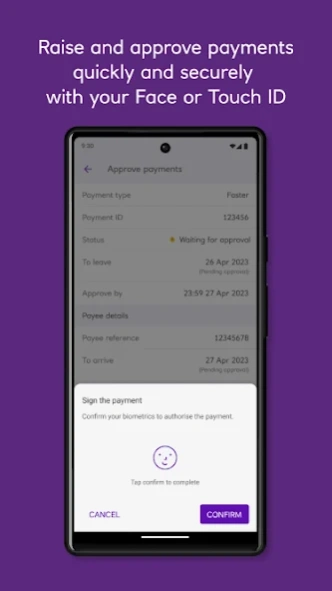
Raise and approve payments wherever you are, without a Smartcard and reader.
Payment approval with Android sets you free, with the UK’s first secure authentication service, for business payments of any size.
The mobile companion to Bankline.
Quick and easy setup with your existing Bankline credentials. Convenient access to your Bankline templates on the go. Create and save templates straight from the app.
Security you can bank on.
Keep your finances secure with fingerprint recognition and set a unique Bankline Mobile keycode.
Bankline Mobile keeps your finances safe with the latest security and encryption technology.
Providing biometric login and advanced anti-fraud systems, our robust security checks make sure your business is protected.
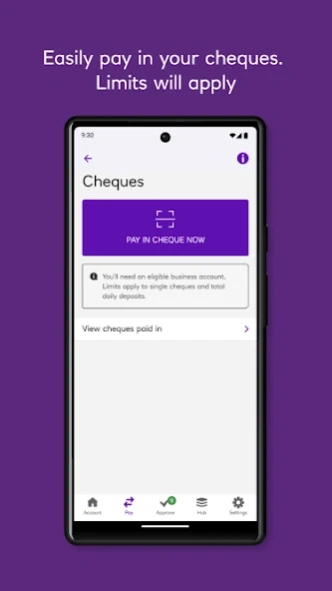
Deposit your cheques using your mobile to save the trip to branch.
Deposit your cheques up to the value of £1k by simply taking a photo and confirming the details before
submitting.
Stay on top of your finances
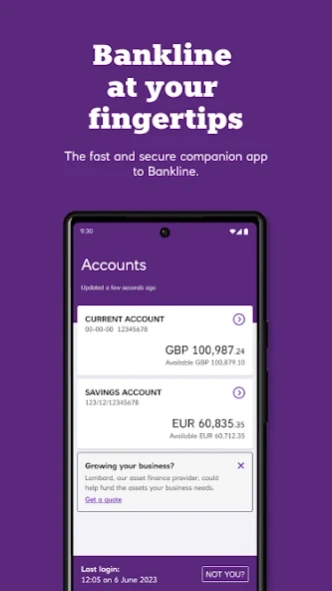
See all of your accounts in one place and get up-to-date account balances in real-time.
View detailed transaction information from the last 15 months.
Easily share PDF confirmations when you approve individual domestic & international payments.
Instant PDF sharing however you like, using WhatsApp, Email or Text (depending on device capabilities).
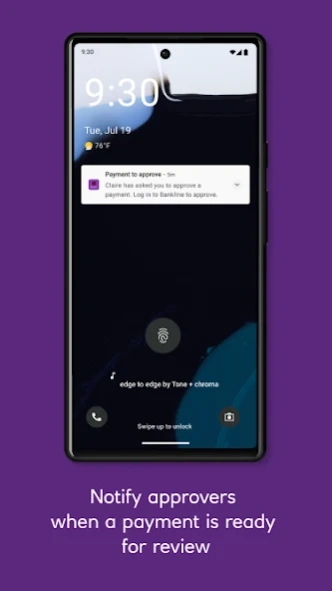
Receive notifications on payments to approve.
Users can notify specific payment approvers when they raise a payment in Bankline Mobile. Notifying those selected payment approvers will make them aware that there is a payment which they need to approve.
Comprehensive support
Quickly access our products and services from our Mobile Hub.
Get help and support from our handy “How to...” guides.
Or you can call the Bankline telephone helpdesk straight from the app.
Our customers are at the heart of every decision we make for Bankline Mobile - occasionally you may be prompted in the app to complete a short survey about your experience, which ensures we’re shaping the app around your needs. We really appreciate your feedback.
If you have suggestions or advice on how this app would work better for you, please contact BanklineMobile@NatWest.com or visit the support centre:
https://www.business.natwest.com/business/ways-to-bank/bankline/help-and-support.html#getintouch
Bankline Mobile is available exclusively to Bankline customers. Access to Bankline Mobile can be managed in your Bankline user settings. If you need help getting set up, simply visit business.natwest.com or drop us an email.
Previous Versions
Here you can find the changelog of NatWest Bankline Mobile since it was posted on our website on 2021-12-11 08:41:28.
The latest version is 26.7.0.29000 and it was updated on 2026-10-11 01:47:44. See below the changes in each version.
NatWest Bankline Mobile version 26.7.0.29000
Updated At: 2026-10-07
Changes: In this update, we’ve introduced new payment management features in Bankline
Mobile, including Payment Summary for a clear overview of all your payments by
status, and International Payment Tracking to track inbound and outbound
international payments using a payment ID.
Available only to Business customers with a Bankline profile.
NatWest Bankline Mobile version 26.5.0.27215
Updated At: 2026-07-15
Changes: In this update, we’ve introduced cookie consent to enhance your privacy and
we’ve also made important security improvements to make the app run more
smoothly.
Available only to Business customers with a Bankline profile.
NatWest Bankline Mobile version 26.4.0.25595
Updated At: 2026-05-19
Changes: In this update, we’ve implemented key security and technical
enhancements behind the scenes to help the app run more smoothly.
Available only to Business customers with a Bankline profile.
NatWest Bankline Mobile version 26.3.0.24545
Updated At: 2026-04-14
Changes: • Weekend transactions now display seamlessly - all payments made over
the weekend will be reflected in your transaction list the same day.
• We’ve also fixed various bugs, and enhanced overall performance for a
more stable experience.
Available only to Business customers with a Bankline profile.
NatWest Bankline Mobile version 26.2.0.24075
Updated At: 2026-03-13
Changes: This update makes it easier to get things done in Bankline Mobile:
• Bulk payments now appear in a clearer, more manageable format.
• Registering is quicker — we’ve replaced manual challenge codes with a
convenient QR code.
• Plus, we’ve continued improving accessibility, fixing bugs, and boosting
performance to deliver a smoother, more secure experience.
Available only to Business customers with a Bankline profile.
NatWest Bankline Mobile version 26.1.0.23702
Updated At: 2026-02-02
Changes: This update makes International Payment Templates smoother and easier to use.
We’ve also made accessibility improvements, fixed various bugs, and enhanced
overall performance for a more stable experience.
Please note: This app is available only to Business customers with a Bankline
profile.
NatWest Bankline Mobile version 25.10.0.23373
Updated At: 2025-11-20
Changes: In this update, we’ve introduced the ability to add pre-booked deals when raising a SEPA international payment, along with key security and technical enhancements behind the scenes.
Please note: The app is only available to Business customers with a Bankline profile.
NatWest Bankline Mobile version 25.9.0.23045
Updated At: 2025-10-28
Changes: In this update we’ve made behind-the-scenes improvements and fixed a few bugs to help the app run more smoothly.
Please note: This app is available only to Business customers with a Bankline
profile.
NatWest Bankline Mobile version 25.6.1.22585
Updated At: 2025-09-11
Changes: In this update we have made some technical improvements behind the scenes.
Please note: The app is only available to Business customers with a Bankline profile.
NatWest Bankline Mobile version 25.4.0.21401
Updated At: 2025-06-09
Changes: In this update, we have added the option to save Purpose Codes as favourites for CHAPS payments. Additionally, this update features improvements in accessibility, various bug fixes, and enhanced performance for greater stability.
You must have Bankline and be a Business customer to use this app
Disclaimer
Official Google Play Link
We do not host NatWest Bankline Mobile on our servers. We did not scan it for viruses, adware, spyware or other type of malware. This app is hosted by Google and passed their terms and conditions to be listed there. We recommend caution when installing it.
The Google Play link for NatWest Bankline Mobile is provided to you by apps112.com without any warranties, representations or guarantees of any kind, so access it at your own risk.
If you have questions regarding this particular app contact the publisher directly. For questions about the functionalities of apps112.com contact us.